
- A Minimum of USD100.00 is required before checking out.
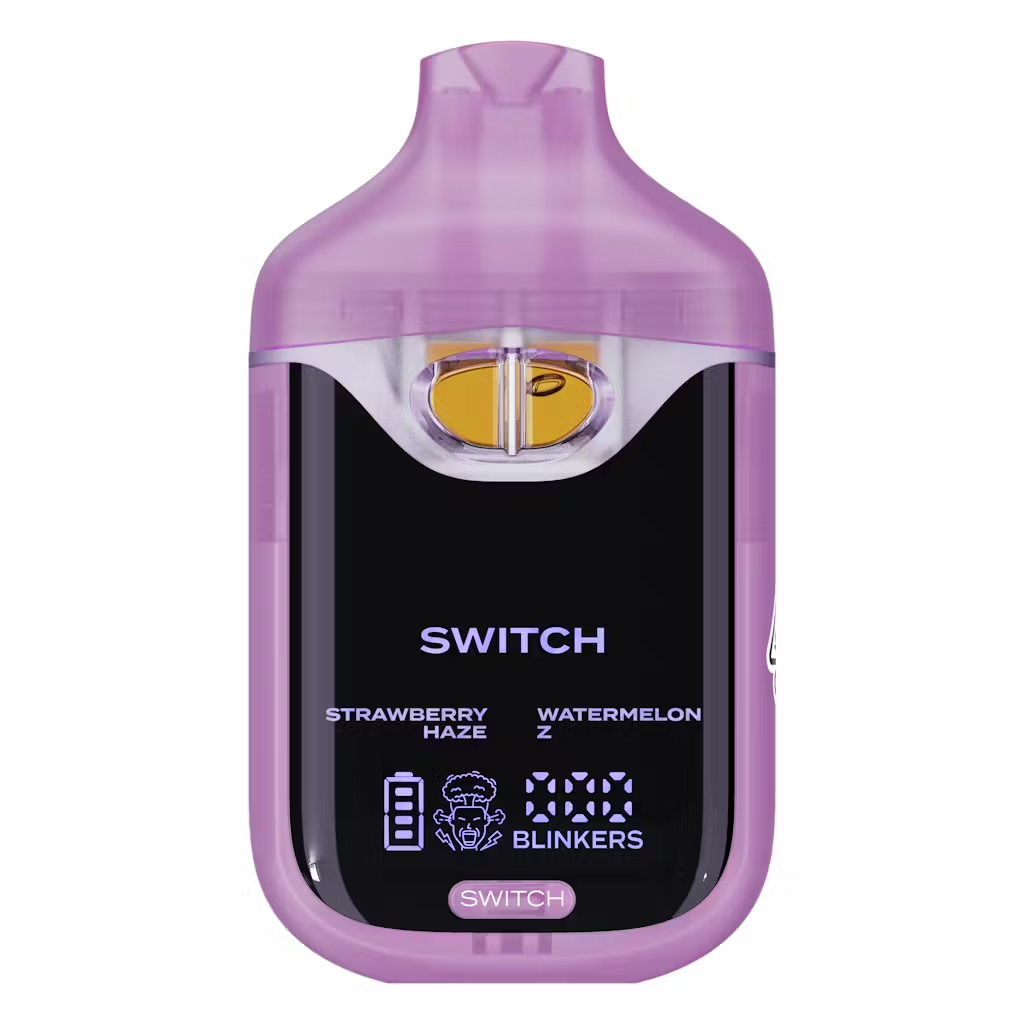
Strawberry Haze x Watermelon-Z
Original price was: $25.00.$18.00Current price is: $18.00.
Description
Description
Boutiq Switch Instructions: Complete Setup, Usage, and Troubleshooting Guide for Every Generation
The Boutiq Switch is one of the most feature-rich disposable THCA devices available — but “feature-rich” also means there’s more to know before your first draw than with a standard single-strain vape. Between the dual-tank switching mechanism, the multiple temperature modes, preheat function, LED display, combo mode, and USB-C charging system, new users consistently have questions that the minimal box instructions don’t fully answer. This guide covers everything: first-use setup, daily operation, mode explanations, LED display decoding, blinker troubleshooting, storage, and generation-specific differences across V3, V4, and V5.
Before Your First Draw: Unboxing Checklist
Getting the setup right before your first session prevents the most common new-user mistakes:
-
Remove the device from packaging carefully — inspect the box for the scratch-off QR authentication sticker; if there is no scratch-off sticker, do not use the device
-
Scratch off the authentication coating and scan the QR code with your phone camera — confirm it returns as genuine and first-use on the Boutiq verification page before proceeding
-
Remove any silicone plugs or protective caps from the mouthpiece — some units ship with a small silicone tip over the mouthpiece that must be removed before drawing
-
Check the oil through the viewing windows — authentic Liquid Live Diamonds fill is golden-amber and viscous; watery, dark, or cloudy oil is a counterfeit indicator; do not use if the oil looks off
-
Charge before first use if required — some units ship partially charged; connect via USB-C and allow the battery indicator to reach full before your first session for the best performance
-
Check the LED display activates (V4/V5) — on first draw or button press, the display should light up immediately showing accurate oil and battery data; a blank or frozen display indicates a counterfeit
How to Activate the Boutiq Switch
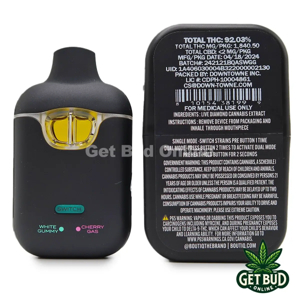
The Boutiq Switch disposable is fully draw-activated across all generations — there is no power button to press before inhaling. Here is the complete activation sequence:
Step 1 — Preheat the oil (recommended for first draw)
Hold the switch button for 5–10 seconds to activate preheat mode before your very first draw. The LED display will show a preheat indicator (V4/V5), and the device warms the Liquid Live Diamonds oil from room temperature to optimal viscosity without firing the coil at full power. Skipping preheat on the first draw often produces a thin, slightly harsh pull — preheating eliminates this entirely. On subsequent draws once the coil is warm, preheat is optional rather than essential.
Step 2 — Place the mouthpiece between your lips
No special technique required — the mouthpiece is ergonomically shaped for a natural lip seal.
Step 3 — Inhale gently and steadily
The device auto-fires the moment airflow is detected. Take a slow, controlled 2–3 second drawrather than a sharp aggressive pull — steady draws produce more consistent vapor density and better terpene expression than quick hard hits. The coil heats the THCA Liquid Live Diamonds oil to vaporization temperature, converting THCA to active delta-9 THC in real time as you draw.
Step 4 — Release the mouthpiece
The device stops firing automatically when you stop inhaling. There is no manual off switch — the auto shut-off built into the device’s internal chip handles power management entirely. The LED glow ring dims when the device returns to idle.
Step 5 — Wait before your next draw
Allow 3–5 seconds between draws to prevent coil overheating and to let the oil re-wick around the coil. Chain puffing without pause is the most common cause of dry, harsh draws and accelerated coil degradation.
How to Switch Between Strains (Single-Strain Mode)
Switching between Tank A and Tank B is the core feature of the Boutiq Switch — here is exactly how it works on each generation:
V3:
-
Single press of the switch button toggles between Tank A (Strain 1) and Tank B (Strain 2)
-
The active tank’s coil fires on the next draw
-
No visual confirmation of active tank on the V3’s basic LED — track your button presses manually
V4:
-
Single press of the toggle button switches between Tank A and Tank B
-
The active strain displays on the LED screen — “single strain mode: press button once to switch between strains; the active strain will display on the screen”
-
The LED display shows which tank is currently selected at all times, removing guesswork
V5:
-
A selector dial rotates between Tank A, Tank B, Tank C, and Infinity Mode positions
-
Rotate to the desired tank position for single-strain use
-
The LED smart screen confirms the active tank selection
Practical tip: Alternate between tanks throughout a session rather than depleting one completely before switching. Keeping both (or all three in V5) tanks at similar levels extends flavor quality, prevents coil burnout from running hot against a near-empty chamber, and gives you the most accurate comparison of each strain’s profile.
How to Use Dual-Strain Mode (Combo Mode / Infinity Mode)
Firing both tanks simultaneously is the second core function of the Boutiq Switch disposable:
V3 — Double-Tap Blend Mode
Double-tap the switch button to activate blend mode. Both coils fire simultaneously on the next draw, delivering vapor from both strain tanks in a single inhale. No visual confirmation of mode status on the V3 — track your tap count manually.
V4 — Combo Mode
Press the toggle button twice to activate combo mode. The LED screen will show both strains simultaneously — “dual strain mode: press the button twice to activate both strains; both strains will display on the screen”. Both coils fire on the next draw and all subsequent draws until you single-press back to single-strain mode. Important: combo mode is “double the consumption” per draw compared to single-strain mode — both tanks deplete at the same rate while combo is active.
V5 — Infinity Mode and Double Infinity Mode
Rotate the selector dial to the Infinity Mode position to fire all three tanks simultaneously. For Double Infinity Mode — blending any two of the three tanks — position the dial between two tank settings. The LED smart screen confirms which mode is active. Like V4 combo mode, Infinity Mode depletes all three tanks simultaneously — use it selectively rather than as a default setting.
How to Read the Boutiq Switch LED Display (V4/V5)
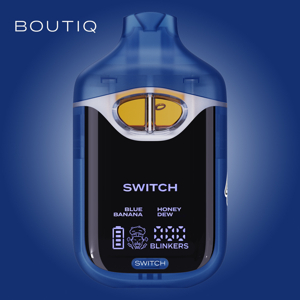
The full LED display is exclusive to V4 and V5 and is the most impactful usability feature in the lineup. Here is what each element shows:
V3 users: The basic LED indicator on the V3 confirms power and battery status only — it does not show per-tank oil level, exact battery percentage, or active mode. All session management on the V3 is done by feel and draw resistance rather than display readout.
Temperature Modes: Low, Medium, and High
The V4 and V5 offer multiple temperature settings that give you meaningful control over draw character. Here is when to use each:
Low Temperature Mode
-
Produces cooler, smoother vapor with maximum terpene preservation
-
Ideal for: fruity and dessert pairings (Rocket Pop × Sour Apple, Fruit Stripe × Push Pop, Biscoff × Jelly Roll) where the lighter aromatic terpenes define the flavor
-
Best for: beginners, low-tolerance users, and daytime sessions where you want the full flavor experience without intensity
-
Single-click through temperature settings to reach low mode
Medium Temperature Mode
-
Balanced output between flavor fidelity and vapor density
-
The right everyday starting point for most experienced users
-
Suitable for: all pairing types; the safe default if you’re unsure where to start
High Temperature Mode
-
Maximum vapor production and potency delivery
-
Best for: gas-forward and earthy pairings (Cactus Jack × Gelonade, Cherry Gas × Cake Mix) where dense vapor is part of the experience
-
Caution: burns off lighter terpene fractions faster, which can flatten flavor complexity on fruity pairings; experienced users only
Switching between modes: Single-click through the temperature settings in sequence — the LED display shows the current mode selected. Start at low or medium on any new flavor pairing before deciding whether to increase heat.
How to Charge the Boutiq Switch
Charging is straightforward but has a few nuances worth knowing:
-
Use the USB-C port at the base of the device — connect to any standard USB-C cable and power source
-
The LED display shows charging status (V4/V5) — battery percentage increments in real time while charging; the indicator light signals when full charge is reached
-
Charge when the battery drops below 20% — the 5-blink warning signal (see Troubleshooting below) indicates low battery; charging before complete depletion extends battery lifespan
-
Do not overcharge — once the display shows full battery, disconnect the charger; leaving the device plugged in after full charge stresses the lithium-ion cell over time
-
The 650mAh battery (V4) supports 3–4 full recharge cycles across the device’s lifetime — the battery is designed to outlast the oil, not to be recharged indefinitely
-
Never use the device while charging — draw-activating while connected to power is not recommended and can stress both the battery circuit and the coil
-
Do not use a fast-charging adapter exceeding the device’s rated wattage — a standard 5W USB-C charge is appropriate; high-wattage laptop chargers or phone fast chargers can overheat the cell
How to Turn Off the Boutiq Switch
This is one of the most commonly searched questions about the device — and the answer is simpler than most users expect:
There is no manual off switch on any generation of the Boutiq Switch. The device is fully automatic — it powers down when not in use through its smart auto shut-off system. When you stop drawing, the coil stops firing within milliseconds. When the device is idle for a period, the internal chip reduces the system to a minimal-power resting state and the LED glow dims or turns off entirely.
If you want to ensure the device is in its lowest-draw resting state — for travel, storage, or to prevent accidental activation in a bag:
-
Simply stop using it — the auto shut-off handles power management without any user input
-
Store it in a case or pouch to prevent accidental draw activation from pressure against fabric or other items
-
Do not attempt to disassemble or manually disconnect the battery — the device is sealed for safety and the internal chip manages all power functions
Boutiq Switch Blinking Light Guide: What Each Blink Means
The LED indicator communicates device status through specific blink patterns — here is the complete decode:
Troubleshooting Common Issues
Device not producing vapor
-
Confirm there are no silicone plugs or protective caps on the mouthpiece
-
Check the battery — 5 blinks indicates low charge; connect USB-C
-
Activate preheat mode — thick Liquid Live Diamonds oil may be too viscous to fire consistently on a cold device
-
Check the oil level through the viewing window — if the tank appears empty on both sides, the device has reached end of life
Harsh or thin first draw
-
Use preheat mode before the first draw of any session
-
Drop to a lower temperature setting — high-temp cold-start draws produce harsh vapor before the coil stabilizes
-
Wait 30–60 seconds after preheat completes before drawing for the most consistent oil viscosity
Weak vapor or low flavor intensity
-
Increase temperature mode from low to medium
-
Activate preheat if not already done — cold oil produces weaker draws regardless of temperature mode
-
Check that you’re not in single-strain mode on a nearly-depleted tank — switch to the fuller tank or activate combo mode
Clogged airflow / draw resistance
-
Take a gentle primer draw without inhaling deeply — this warms the oil and can break up any viscous blockage in the airflow channel
-
Activate preheat mode to warm the oil to lower viscosity
-
Store the device upright at room temperature — cold storage thickens the oil and increases clog likelihood
-
Never attempt to clear a clog by blowing into the mouthpiece — this pushes oil into the airflow channel and makes blockage worse
LED display not activating (V4/V5)
-
If the display doesn’t light on first draw, attempt a USB-C charge first — a deeply discharged battery may not show the display until partially recharged
-
If display remains blank after charging, this is the most reliable indicator of a counterfeit device; do not continue using it and contact the retailer
3-blink connection error
-
Try preheating the device — the 3-blink pattern often occurs when thick cold oil hasn’t reached operating viscosity and the coil isn’t making clean contact with the oil
-
Allow the device to warm to room temperature if it’s been stored somewhere cold
-
If 3-blink persists after preheat and temperature normalization, contact the retailer
Generation-Specific Instructions at a Glance
Storage and Maintenance Instructions
Proper storage extends device longevity, preserves oil quality, and prevents the airflow issues that most users attribute to product defects:
-
Store upright — keeping the device vertical ensures both tanks wick evenly and prevents oil from pooling against the airflow channel or mouthpiece
-
Room temperature storage — Liquid Live Diamonds oil thickens significantly in cold environments; storing the device at room temperature (65–75°F / 18–24°C) maintains optimal oil viscosity for consistent draws
-
Avoid direct sunlight and heat — elevated temperatures degrade the cannabis-derived terpenes in the oil and stress the lithium-ion battery; never leave the device in a hot vehicle, on a windowsill, or near a heat source
-
Keep away from moisture — the USB-C port and the LED display module on V4/V5 are not waterproof; keep the device dry and away from humid environments
-
Use a protective case for travel — prevents accidental draw activation from bag pressure, protects the LED display from impact, and keeps the mouthpiece clean
-
Do not store at full charge for extended periods — if you won’t be using the device for more than a week, let the battery run down slightly from full charge before storing; lithium-ion cells degrade faster when stored at 100% for prolonged periods
Safety Instructions
These are not optional warnings — they are operationally important for every user regardless of experience level:
-
Adults 21 and older only — the 90%+ THCA concentration in Liquid Live Diamonds oil converts to high-potency delta-9 THC at vaporization temperature; this is a concentrate-grade product
-
Start with a single 1–2 second draw on any new device or flavor pairing, regardless of prior experience with lower-potency products — wait five minutes before drawing again
-
Do not use combo mode or Infinity Mode on your first session with a new device — understand single-tank potency before engaging blended draws
-
Do not drive or operate machinery after use — the effects of vaporized high-potency THCA onset within 1–3 minutes and can be significantly more intense than flower or standard distillate
-
Verify QR authentication before every new device — do not draw from any Boutiq Switch that fails authentication or shows counterfeit oil characteristics
-
Keep the 8-second draw cutoff in mind — the device auto-stops after 8 seconds to prevent coil overheating; this is a safety feature, not a malfunction
-
Legal status varies by state — the Boutiq Switch is sold as a hemp-derived THCA product federally, but several states restrict or ban high-potency THCA products; verify your local laws before purchasing or transporting.
Delivery Info
- Standard and Express delivery services are available for all items.
- Shipping costs are calculated at the checkout page (after delivery option & destination confirmation).
- Tracking is available for all delivery options.
- Items are delivered during standard business hours.



Reviews
There are no reviews yet.