
- A Minimum of USD100.00 is required before checking out.
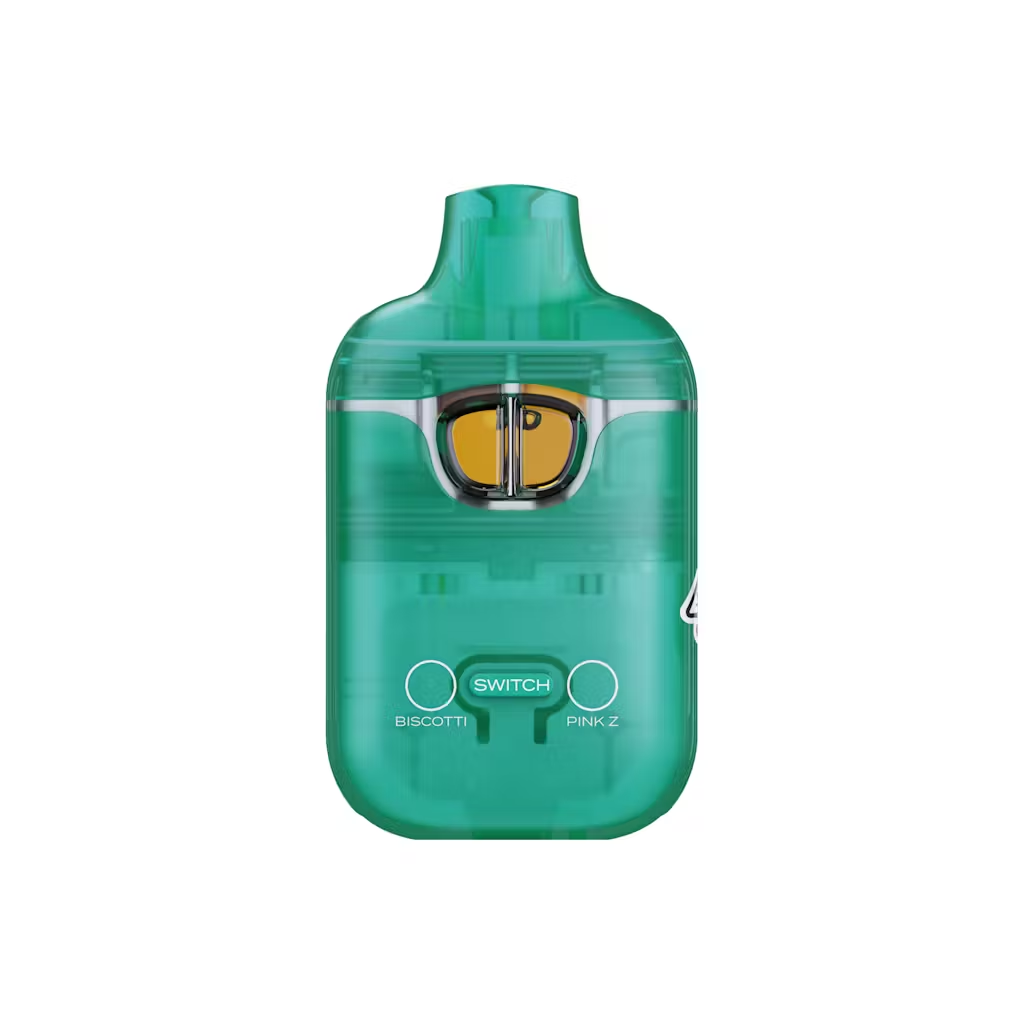
Biscotti x Pink Z
Original price was: $20.00.$15.00Current price is: $15.00.
Biscotti: Hybrid | Pink Z: Indica
- Earthy
- Coffee
- Sweet
Description
Description
How to Preheat a Boutiq Switch (V4, V5, and Older Models) in 2026
On most Boutiq Switch devices, you preheat by using the button, not the draw: you quickly press the button 2 times to start a 10–15 second low‑voltage warm‑up cycle (often shown by a white or purple flashing LED), or on some V4 Glow units you hold the button to run a brief preheat before taking a hit.
What you need to know first
“How to preheat Boutiq Switch” depends on the generation you’re using:
-
Most V5 models: dedicated 2‑click preheat mode.
-
Many V4 Glow units: a press‑and‑hold preheat function tied to the front button.
-
Older V2/V3 hardware: some preheat behavior exists, but it’s inconsistent and not always on the official packaging.
Preheat is a low‑voltage warm‑up—around 1.8–2.0 V—that gently heats the oil for 10–15 seconds to thin thick live diamonds and clear minor clogs, not to give you an extra‑strong hit.
Quick answer overview
-
Boutiq V5: Press the button 2 times quickly to activate preheat; LED typically flashes white/purple for 10–15 seconds then shuts off.
-
Some V5 batches use 2 clicks + hold on the third press as an alternative trigger, but 2‑click is most common.
-
Boutiq V4 Glow: Hold the button to initiate a short preheat cycle that warms thick oil and improves first‑hit flow.
-
Preheat is meant for cold/thick oil or minor clogs, not for every single puff.
-
Don’t run multiple preheat cycles back‑to‑back; let the device rest between cycles to avoid overheating.
How to preheat a Boutiq Switch V5
A detailed V5 preheat guide spells out the behavior:
1. Standard V5 preheat activation
-
Make sure the device is powered on and has enough battery.
-
Press the power button 2 times quickly.
-
If successful, you should see:
-
LED flashing or pulsing (often white, purple, or light blue).
-
A 10–15 second preheat cycle at low voltage (~1.8–2.0 V).
-
Automatic shutoff when the cycle completes.
-
Global Vape Store summarizes it: “Most Boutiq V5 models do feature a preheat mode… Press the power button 2 times quickly… LED flashing or pulsing… warm‑up cycle lasting around 10–15 seconds.”
2. Alternative V5 preheat activation (some versions)
Because Boutiq tweaks hardware by batch, some V5 units use a slightly different gesture:
-
Press the button 2 times and then hold on the third press.
-
The LED pattern changes and a timed warm‑up mode runs, again for roughly 10–15 seconds.
If 2 quick clicks don’t clearly start preheat, try 2 clicks + hold and look for a unique LED pattern not used for voltage switching.
3. How to stop V5 preheat manually
Even though preheat auto‑stops, it’s helpful to know the manual cancel:
-
Press the button once to stop the cycle immediately.
Use this if you accidentally trigger preheat or if you see the oil is flowing freely and no longer needs warming.
How to preheat a Boutiq Switch V4 (Glow and similar)
The Switch V4 doesn’t always advertise preheat as loudly as V5, but at least some V4 Glow units do include a preheat function:
-
A V4 Glow review lists as a feature: “Preheat Function: Hold down the button to initiate a preheat cycle, which can help cold hits in colder temperatures and improve vapor flow from the first hit.”
So for V4 Glow‑style devices:
-
Hold down the button (instead of a quick tap) to start preheat.
-
The device runs a short warm‑up cycle to loosen cold/thick oil.
-
Release and then take a normal draw for your hit.
Because V4’s main firing is draw‑activated, preheat is only about priming the coil and oil, not replacing your inhale. Always watch the screen/LED for any unique icon or color while holding the button.
Older models (V2/V3): inconsistent, unofficial preheat
A user in r/fakecartridges documented a hidden preheat on some V2 hardware:
-
For certain V2 units:
-
Choose flavor mode (single or dual).
-
Press and hold the switch button for ~2 seconds.
-
Device blinks twice, preheats, then stops blinking when done; tap again to exit.
-
They also note:
-
Original V2‑3 packaging does not always mention preheat, and some preheat claims actually appear on fake V1 boxes.
-
Acknowledge that some older V2/V3 devices may support button‑hold preheat, but it’s not consistently documented or guaranteed.
-
For safety and clarity, focus your “how to preheat” answer on V5 2‑click and V4 Glow hold‑to‑preheat, which are better supported.
When and why to use preheat on a Boutiq Switch
Boutiq/V5 preheat guides and reviews recommend preheat specifically for:
-
Cold environments – if your device was in a cold car or outside and the oil looks thick or barely moving.
-
Thick liquid live diamonds – when the oil moves very slowly and you’re getting tight airflow or weak hits.
-
Light clogs or slow airflow – preheat can gently loosen condensed oil near the coil and sensor so the next hit is smoother.
Key points:
-
Preheat runs at low voltage (around 1.8–2.0 V), so it warms without burning.
-
It’s meant to improve hardware performance, not to get you “extra high.”
Guides advise:
-
Only use preheat when needed (cold/clogged oil).
-
Do not run multiple cycles consecutively.
-
Allow the cartridge to cool between sessions.
-
Stop immediately if the cartridge tastes burnt or smells wrong.
FAQ: How to preheat a Boutiq Switch
How do I preheat my Boutiq Switch V5?
On most V5 units, press the button 2 times quickly to activate preheat. The LED will flash or pulse (often white or purple) for about 10–15 seconds while the device gently warms the oil, then stop automatically.
Does every Boutiq Switch V5 have preheat?
Most V5 models include preheat, but a few older batches do not, and activation/LED colors can vary slightly. If 2 clicks and 2 clicks + hold don’t trigger any special light pattern and your packaging/manual doesn’t mention preheat, your unit may not support it.
How do I preheat my Boutiq Switch V4?
On V4 Glow devices, you can hold down the button to initiate a preheat cycle, which warms thick or cold oil and improves vapor flow on the first hit. Release, then take a normal draw. Not every V4 variant advertises preheat, so check your box or manual.
Is preheating bad for my Boutiq Switch?
Used correctly, preheat is safe and designed to help with thick oil and clogs. Overusing it—running multiple cycles back‑to‑back, or using it when the oil is already hot—can waste oil and stress the coil, so keep it occasional and stop if you notice burnt taste.
Delivery Info
- Standard and Express delivery services are available for all items.
- Shipping costs are calculated at the checkout page (after delivery option & destination confirmation).
- Tracking is available for all delivery options.
- Items are delivered during standard business hours.



Reviews
There are no reviews yet.