
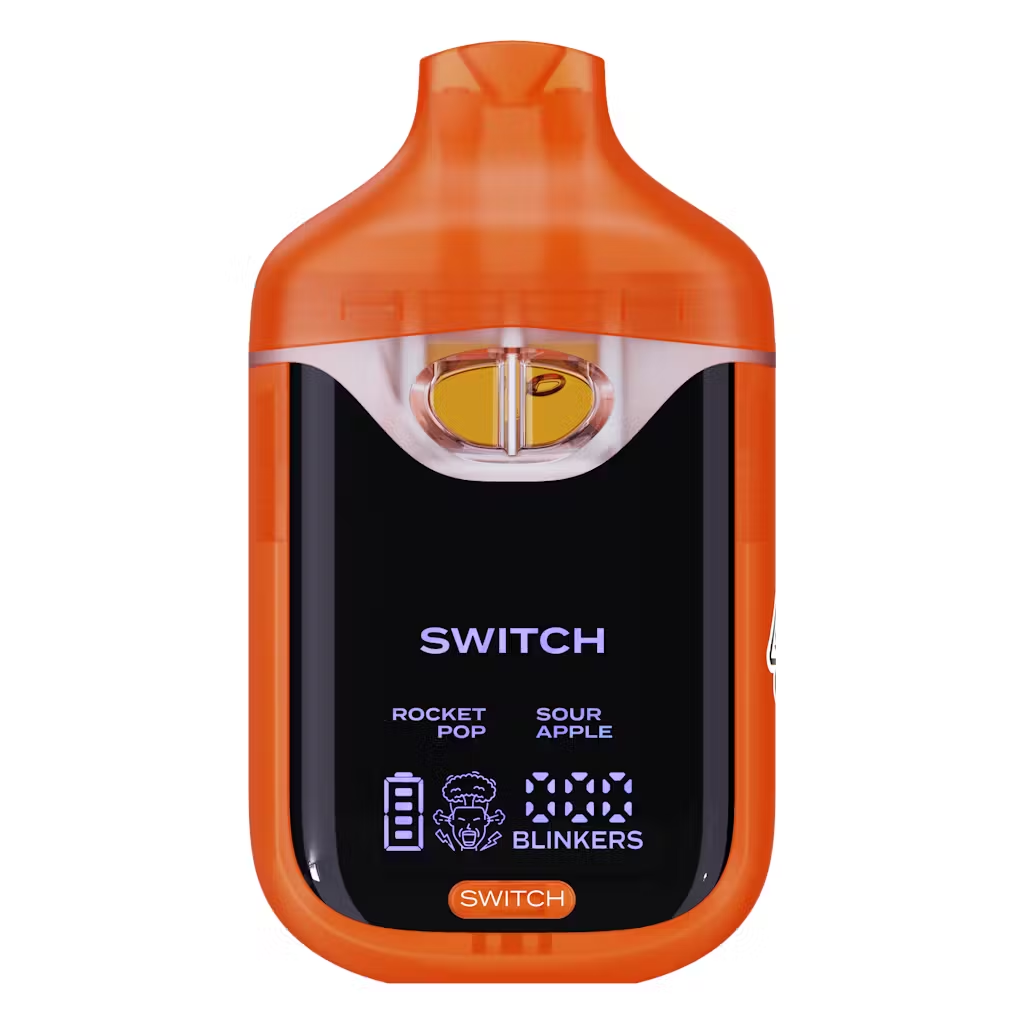
Rocket Pop x Sour Apple
$25.00
Description
Description
How to Use Boutiq Switch V3: Dual‑Flavor Button Guide
To use a Boutiq Switch V3, you remove it from the packaging, take off all protective caps, then press and hold the button while inhaling to hit it, using single or double presses on the same button to switch between the two flavors or enable dual‑flavor mode depending on your unit’s pattern.
What you need to know first
Boutiq Switch V3 is a dual‑flavor disposable: a pre‑filled, 2 g vape with two strains in one device. Unlike later V4/V5 models that lean on auto‑draw and dials, the V3 line is defined by a button‑based flavor switch—you use the button for both firing and toggling which internal tank you’re hitting. Many users initially think their V3 is dead until they realize they must hold the button while hitting, not just click it like a mod.
Quick answer overview
-
Unpack your Boutiq Switch V3 and remove any silicone plugs or caps from the mouthpiece.
-
The device is pre‑charged and pre‑filled; there’s no assembly or refilling required.
-
To hit it, press and hold the button while you inhale—just clicking won’t fire the coil.
-
Press the button once to switch from flavor/strain 1 to flavor/strain 2; the LED by that strain lights up.
-
Some versions support a dual‑flavor blend mode via a double‑tap or dedicated pattern, letting you hit both flavors at once.
Step‑by‑step: how to use Boutiq Switch V3
1. Unpack and prep the device
A V3 product page outlines the basic first steps:
-
Unpack the device: Remove the disposable from its box or blister.
-
Remove protective caps: Take off any silicone or plastic mouthpiece covers.
-
Check airflow: Make sure no stickers or plugs block tiny air holes on the body.
The V3 is sold as pre‑filled with THC oil, ready to go out of the box. You don’t need to screw in carts or add oil.
2. Understand the dual‑flavor layout
Switch V3 is built around two internal strains in one disposable—for example, RS11 x Pink Guava in one device.
-
Each strain has its own indicator light above the label.
-
You can vape one strain at a time or, on some V3s, run both together in a dual mode.
Think of it as “two 1 g carts in one shell,” with the button deciding which you’re pulling from.
3. Turn it on / firing basics
The V3 does not behave like a V4/V5 auto‑draw; it’s button‑based.
A Reddit user with a “V3 won’t hit” issue eventually discovered:
“Bro it turned out I just needed to hold the button instead of pressing 5 times.”
In practice:
-
You do not need a classic “5‑click on/off” like a box mod.
-
You press and hold the button while you inhale to fire the device.
So your basic hit sequence is:
-
Put the mouthpiece to your lips.
-
Hold the button down.
-
Inhale steadily for 2–4 seconds.
-
Release the button and exhale.
If you only tap the button quickly and then inhale, nothing happens—this is the most common V3 user mistake.
4. Switch between flavors
A V3 product description summarizes the flavor control:
-
“Single Strain Mode: Press button once to switch between strains. The light above the selected strain will light up to show which strain is activated.”
That means:
-
When you press the button once (a quick click), the active strain toggles:
-
Light 1 on → you’re on flavor/strain 1.
-
Light 2 on → you’re on flavor/strain 2.
-
After switching, you must press and hold the button again for the actual puff, since the short press only changes selection.
5. Use dual‑flavor blending (if your V3 supports it)
The same V3 description adds:
-
“Dual Flavor Blending: Users can blend both flavors for a unique vaping experience.”
In videos showcasing V3, creators demonstrate a double‑tap or special press pattern to engage both flavors, often described as a “double mode.” The general behavior:
-
Normal single press = swap to one strain.
-
Special pattern (often double‑tap) = enable both strains at once, so both indicator lights are on and you get a mixed flavor.
-
“Tap once to switch strains, use the dual‑flavor pattern to fire both at once for a blended hit.”
Practical tips for using Boutiq Switch V3
-
Take short test pulls first
With 2 g of oil and dual flavors, effects can stack quickly. Start with short 2–3 second hits before holding the button to the auto‑cut limit. -
Watch the LEDs to avoid flavor confusion
The light above the active strain tells you which flavor is live. If you’re expecting strain A effects but keep lighting strain B’s LED, you’ll feel the difference. -
Don’t hit while charging (if yours has a port)
User reports for similar Boutiq devices note that they often won’t fire while plugged in, and it’s not recommended to try. -
Treat dual‑flavor mode as stronger
When dual mode is on, you’re effectively drawing from both oil paths, so expect a more intense hit than single‑strain mode.
Troubleshooting: when Boutiq V3 won’t hit
If your Switch V3 doesn’t seem to work, check these before assuming it’s dead:
-
You’re not holding the button
The Reddit V3 case shows the #1 issue: the owner kept pressing 5x like a normal vape until they realized they had to hold the button while inhaling. Make sure you’re actually holding, not just tapping. -
Check airflow and caps
Confirm no silicone or packaging plugs are still on the mouthpiece and you’re not blocking air holes with your grip. -
Device might be out of battery or oil
If it once hit and now doesn’t respond (even when used correctly), it could be drained or empty. V3s are disposables—they are pre‑charged and not meant to be refilled.
If all the above checks out and it still won’t hit, most reliable advice is to treat it as a defective or finished disposable rather than trying to open or “repair” it.
FAQ: How to use Boutiq Switch V3
How do you hit a Boutiq Switch V3?
Hold the device, press and hold the button, and inhale through the mouthpiece for 2–4 seconds. Releasing the button stops the hit. Just tapping the button without holding it won’t fire the coil.
How do you switch flavors on a Boutiq V3?
Press the button once to switch between the two strains. The LED above the selected strainlights up to show which flavor is active, then you hold the button and inhale to hit that strain.
Can you hit both flavors at once on the Boutiq Switch V3?
Yes. V3 product descriptions state that it supports dual flavor blending, letting users blend both flavors for a unique vaping experience. This is typically activated via a special press pattern (commonly a quick double‑tap) indicated by both LEDs being on.
Do you need to charge a Boutiq Switch V3 before using it?
Boutiq V3 disposables are sold as pre‑charged and pre‑filled, ready to use out of the box. Some units may support recharging, but you don’t need to charge a new one before first use unless the battery shipped low.
Delivery Info
- Standard and Express delivery services are available for all items.
- Shipping costs are calculated at the checkout page (after delivery option & destination confirmation).
- Tracking is available for all delivery options.
- Items are delivered during standard business hours.


Reviews
There are no reviews yet.